
Knowing how to operate card machine correctly is important for any business that accepts card and contactless payments. Modern payment terminals are designed to make transactions quick and straightforward, but staff still need to understand the basic process to avoid incorrect amounts, declined transactions, and unnecessary delays.
Whether you are using a card machine for the first time or training employees to process payments, learning the correct steps can make everyday transactions much easier. From switching on the terminal and entering the payment amount to accepting a card, confirming authorisation, and handling receipts, each stage plays an important role.
This guide explains how to use a card machine safely and efficiently, including different payment methods, common problems, security practices, and tips for smoother transactions.
What Is a Card Machine?
A card machine, also known as a payment terminal or card reader, is an electronic device that allows businesses to accept payments from debit cards, credit cards, contactless cards, and supported mobile wallets.
Depending on the model, a terminal may connect through Wi-Fi, mobile data, Bluetooth, or a wired internet connection. Modern machines can generally process chip-and-PIN and contactless payments, while some also support additional payment options.
The basic process is simple: the business enters the amount, the customer presents their payment method, the transaction is checked and authorised, and the terminal displays the result.
For businesses, the right payment equipment can make checkout faster while giving customers convenient ways to pay. Speedy Payments provides different payment solutions for businesses through its website, including card payment machines and other payment technologies.
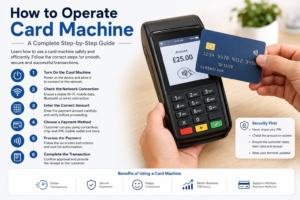
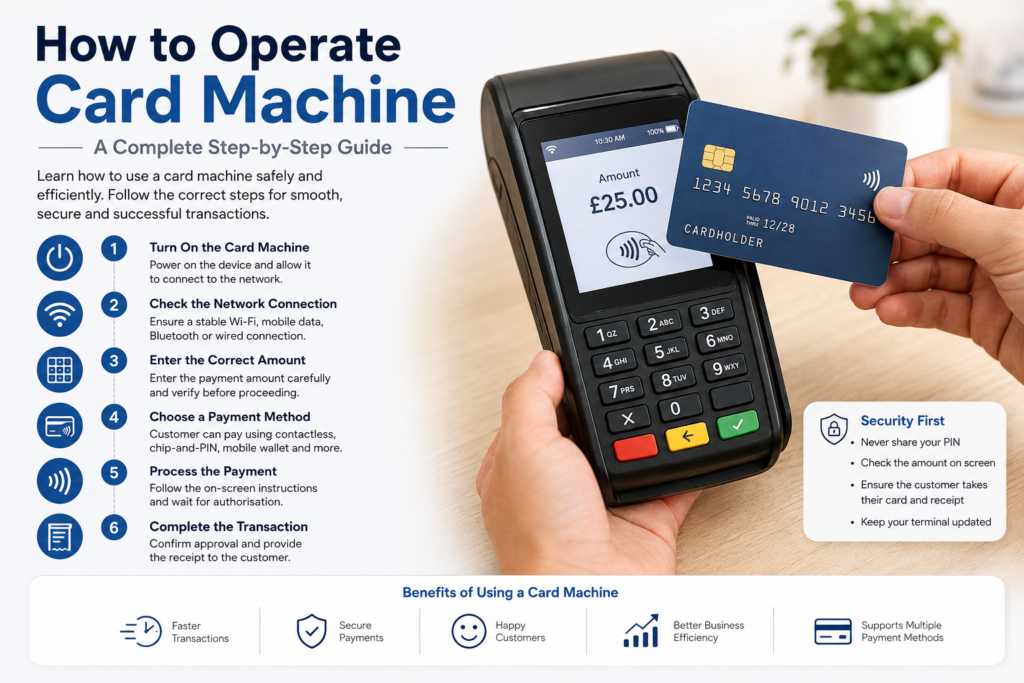
How to Operate Card Machine Step by Step
Although individual terminals can have different buttons and menus, the basic payment process is similar across most modern devices.
1. Turn On the Card Machine
Before accepting a payment, make sure the card machine has sufficient battery power or is connected to its charging or power source.
Press the power button if the device is switched off and allow it to complete its startup process. Some terminals may take a few moments to connect to their payment network.
If the machine displays an error during startup, check the power connection and follow the instructions displayed on the screen.
For mobile or battery-powered terminals, it is useful to keep the device adequately charged before busy periods.
2. Check the Network Connection
A card machine needs a reliable connection to communicate with the payment processing network.
Depending on your terminal, this may be provided through Wi-Fi, Ethernet, Bluetooth, or a mobile data connection.
Before processing a transaction, check whether the device shows a stable connection. A weak or interrupted connection can cause transactions to take longer or prevent the payment from being completed.
If your machine regularly loses connectivity, check the network first rather than repeatedly attempting the same transaction.
3. Enter the Correct Transaction Amount
Once the terminal is ready, enter the amount the customer needs to pay.
Take a moment to check the figures before asking the customer to present their card. Entering an incorrect amount can create confusion and may require a refund or cancellation.
Some modern payment systems may also allow additional information, such as tips or transaction references, depending on the setup.
Accuracy is particularly important when processing several payments in succession because a simple keypad error can result in the wrong amount being charged.
4. Ask the Customer to Choose a Payment Method
After entering the amount, allow the customer to use their preferred supported payment method.
Common options include:
- Contactless card
- Chip-and-PIN card
- Supported smartphone or smartwatch
- Other payment methods supported by the terminal
Contactless payments use near-field communication technology to transfer payment information between the card or device and the reader.
The customer should follow the instructions shown on the terminal rather than being asked to provide sensitive payment information verbally.
5. Process a Contactless Payment
Contactless is one of the quickest ways to complete a face-to-face card transaction.
When the terminal displays the contactless prompt, ask the customer to hold their contactless card or compatible mobile device near the reader.
The terminal normally provides an audible or visual confirmation when the payment has been successfully read. Depending on the transaction and the customer’s bank or payment method, the terminal may sometimes request additional verification.
Digital wallets can also be used on compatible terminals. The customer may need to authenticate their mobile device before presenting it to the reader.
Always wait for the terminal to display the transaction result before considering the payment complete.
6. Process a Chip-and-PIN Payment
If the customer chooses to use a chip card, ask them to insert the card into the appropriate slot.
The card should remain in the terminal until the machine instructs the customer to remove it. The customer may then be asked to enter their PIN using the terminal keypad.
The customer should enter their PIN privately without sharing it with business staff.
Once the payment has been authorised, the terminal will display a confirmation message. Only after receiving confirmation should the transaction be treated as successfully completed.
Following the terminal’s instructions is important because payment procedures can vary between card types and terminal configurations.
7. Wait for the Payment Confirmation
One of the most important steps when learning how to operate card machine is understanding that seeing the card being tapped or inserted does not automatically mean the transaction has been approved.
Always check the terminal screen for the final status.
A successful payment may display wording such as:
- Approved
- Payment successful
- Transaction complete
If the terminal displays a declined or failed message, do not assume that the payment has gone through.
The customer can then try another supported payment method or contact their bank if necessary.
8. Provide the Receipt
After a successful transaction, the terminal may offer options for printing or sending a receipt electronically.
Depending on your payment setup, the customer may receive a printed receipt, digital receipt, or confirmation through another system.
Receipts are useful for customers and businesses because they provide a record of the transaction. Businesses should also follow their payment provider’s guidance for storing transaction records.
9. Return the Card or Payment Device
If the customer used a chip card, make sure the card can be removed safely once the terminal instructs them to do so.
For contactless transactions, the customer normally keeps their card or phone in their possession throughout the payment.
Avoid handling a customer’s card unnecessarily. Letting the customer control their own payment method can provide a more secure and professional experience.
How to Operate Different Types of Card Machines
Card machines can differ depending on how and where they are used.
For businesses that need flexibility, mobile card machines for small businesses can be useful because they can support payments in different locations, depending on the device and network available.
Portable card machines are another option for businesses that need to move the payment terminal around their premises rather than keeping it permanently in one location.
A credit card processing machine can also form part of a broader payment setup that connects transactions with other business systems.
Before choosing a terminal, consider factors such as connectivity, battery life, transaction requirements, portability, payment methods, reporting features, and support.
Common Card Machine Problems and Solutions
Even when a terminal is used correctly, occasional problems can occur.
Card Machine Is Not Connecting
First, check the Wi-Fi, Ethernet, Bluetooth, or mobile network connection. If the connection appears normal, restarting the terminal may resolve a temporary software or communication issue.
If the problem continues, contact your payment provider for assistance.
Customer’s Card Is Declined
A declined transaction does not necessarily mean the card is faulty. The customer’s bank may have declined the payment for several reasons.
Do not repeatedly attempt the transaction without checking the terminal’s instructions. Instead, ask the customer to try another payment method or contact their card issuer.
Contactless Payment Does Not Work
Check that the customer is presenting the card or device close to the correct contactless area.
If contactless continues to fail, the customer may be able to insert their card and complete a chip-and-PIN transaction instead.
Terminal Freezes
If the terminal becomes unresponsive, check whether it has sufficient battery power and follow the manufacturer’s restart instructions.
Avoid repeatedly switching the device off during an active transaction unless instructed by your provider, as this could complicate transaction status checks.
Card Machine Security Best Practices
Security should always be part of your payment process.
Keep the terminal in a secure location when it is not being used and regularly inspect the device for anything unusual. Staff should never ask customers to reveal their PIN.
It is also important to keep the machine’s software and firmware updated when updates are provided by the payment provider.
Employees should be trained to recognise unusual behaviour, suspicious requests, or signs that a terminal may have been tampered with.
Never record customer PINs or store sensitive payment information outside approved payment systems.
Following these basic practices can help businesses maintain a safer payment environment and protect both customers and staff.
Tips for Faster and Smoother Card Payments
Once your team understands how to operate card machine, a few simple habits can make transactions even more efficient.
Train Every Member of Staff
Do not rely on one employee to understand the payment terminal. Everyone who handles customer transactions should know how to start a payment, process different payment methods, identify approval messages, and respond to basic errors.
Check the Terminal Before Busy Periods
Make sure the machine is charged, connected, and ready before your busiest trading periods.
Double-Check Amounts
Take a second to confirm the amount before the customer pays. This simple habit can prevent unnecessary corrections.
Keep the Terminal Accessible
Position the terminal so customers can easily see the screen and enter their PIN privately.
Monitor Transaction Records
Regularly review transaction reports and receipts to identify unusual activity, failed payments, refunds, or discrepancies.
Choosing the Right Card Payment Solution
The best card machine depends on your business model, transaction volume, location, and payment requirements.
A fixed terminal may work well where payments are processed at one dedicated checkout point. A portable or mobile solution may be more suitable when staff need to take payments in different areas.
When comparing payment solutions, look beyond the device itself. Consider transaction fees, contract terms, settlement times, connectivity, supported payment methods, customer support, and any additional software or equipment required.
Speedy Payments offers payment solutions designed to help businesses manage card transactions with different payment machine options and flexible payment services. You can explore the available solutions through the Speedy Payments website.
Final Thoughts
Learning how to operate card machine does not have to be complicated. The process generally involves preparing the terminal, entering the correct amount, allowing the customer to choose a supported payment method, following the on-screen instructions, confirming authorisation, and providing a receipt when required.
The most important habits are accuracy, security, and patience. Always confirm that a transaction has been approved before considering it complete, and make sure customers can enter sensitive information privately.
With proper staff training and a suitable payment solution, businesses can make card transactions faster, more reliable, and easier to manage.
If you are looking for a payment solution for your business, visit Speedy Payments to explore available card payment options.
Frequently Asked Questions
1. How do I operate a card machine for the first time?
Start by turning on the terminal and checking its network connection. Enter the transaction amount, allow the customer to present their card or device, follow the prompts, and wait for the final approval message before completing the transaction.
2. How do I take a contactless payment?
Enter the transaction amount and wait for the contactless prompt. Ask the customer to hold their contactless card or compatible device near the reader until the terminal confirms the transaction.
3. Does a customer always need to enter a PIN?
No. Some contactless transactions can be completed without a PIN, while other transactions may require additional verification. The terminal will tell the customer what action is required.
4. What should I do if a card payment is declined?
Check the message displayed by the terminal and avoid assuming the payment was successful. The customer can try another payment method or contact their card issuer if necessary.
5. Why is my card machine not connecting?
The problem may be related to Wi-Fi, mobile data, Ethernet, Bluetooth, or another network connection. Check the connection and restart the device if appropriate. Contact your payment provider if the problem continues.
6. Can customers pay with a smartphone?
Yes, compatible terminals can accept payments from supported mobile wallets. The customer generally authenticates their device and presents it near the contactless reader.
7. How can I keep my card machine secure?
Keep the terminal in a controlled location, inspect it regularly, install recommended updates, and train staff not to request or record customer PINs.
8. What happens after a successful card payment?
The terminal displays a confirmation message and may provide receipt options. Depending on the setup, a receipt can be printed or provided electronically.
9. Can one card machine accept different types of payments?
Many modern terminals support several payment methods, including chip-and-PIN, contactless cards, and compatible mobile wallets. Available options depend on the terminal and payment provider.
10. How can I choose the right card machine for my business?
Consider where you accept payments, how frequently you process transactions, your connectivity requirements, preferred payment methods, portability needs, fees, contract terms, and customer support before choosing a solution.